Skript

Automatischer Action-Name ApiAddin

Da ich derzeit viel mit der EPLAN-API machen darf, hab ich mir mal Gedanken gemacht wie man das ewige Action deklarieren automatisieren kann.

Die Deklaration funktioniert ein bisschen anders als im Scripting und somit kann man auch auf die Methoden- / bzw. Klassennamen zugreifen.

Mit dieser Lösung wird immer der Klassenname als Action-Name verwendet, was für mich immer zutreffend ist.
In diesem Beispiel wäre der Action-Name MyAction:

using Eplan.EplApi.ApplicationFramework;
using System;
using System.Reflection;

namespace Suplanus.EplAddin.Examples
{
    class MyAction : IEplAction
    {
        public bool OnRegister(ref string Name, ref int Ordinal)
        {
            Name = MethodBase.GetCurrentMethod().DeclaringType.Name; // Get name from class
            Ordinal = 20;
            return true;
        }

        public bool Execute(ActionCallingContext oActionCallingContext)
        {
            throw new NotImplementedException();
        }

        public void GetActionProperties(ref ActionProperties actionProperties)
        {
            throw new NotImplementedException();
        }
    }
}
Von |2017-11-09T11:24:17+01:002015-04-14|EPLAN, EPLAN-API|

XGedUpdateMacroAction

Werden Makros in EPLAN über die Funktion „Makro aktualisieren“ erneuert, wird leider der Wertesatz auf den Ursprungswert gesetzt.

Mit diesem Script wird der Wertesatz nicht verändert.

Die Action überschreibt die eigentlich EPLAN-Action. Da es hier zu einem Bufferoverflow kommen würde muss die eigentliche Action mit dem ActionCallingContext ausgestattet werden.

XGedUpdateMacroAction


using Eplan.EplApi.ApplicationFramework;
using Eplan.EplApi.Scripting;

namespace Suplanus.Scripts.Global
{
    class XGedUpdateMacroAction_Overload
    {
        [DeclareAction("XGedUpdateMacroAction", 50)] // Overwrite with ordinal
        public void Action()
        {
            ActionCallingContext actionCallingContext = new ActionCallingContext();
            actionCallingContext.AddParameter("AutoAssignLastUsedRecord", "1");
            Eplan.EplApi.ApplicationFramework.Action action = new ActionManager().FindBaseActionFromFunctionAction(false); // Full Namespace, couse of compiler warning in EPLAN
            action.Execute(actionCallingContext);
        }
    }
}
Von |2026-07-23T12:52:19+02:002015-02-24|EPLAN, EPLAN-Scripts|

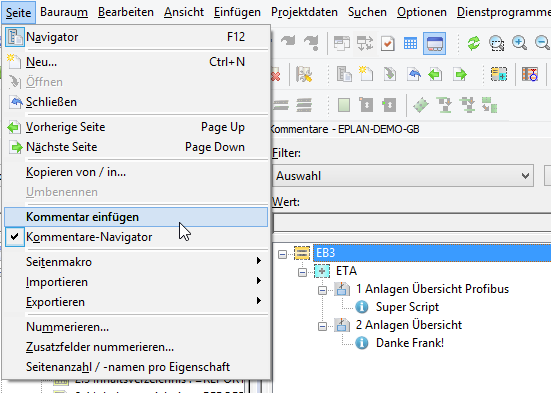
InsertComment

Ein echtes Schmankerl von Frank…

Mit diesem Script können PDF-Kommentare nun auch in EPLAN platziert werden und man kann somit den Kommentarnavigator nutzen. Super im Multiuserbetrieb!

2015-02-02_21-57-48

Von |2022-01-10T08:24:48+01:002015-02-06|EPLAN, EPLAN-Scripts|

EPLAN Pong

Der Preis für die beste EPLAN Erweiterung geht an Daniel Papp!

Das ganze funktioniert als API-Addin und ist auf Github zu finden. Einfach klasse :^)

Von |2017-11-09T12:23:54+01:002014-11-26|EPLAN, EPLAN-API|

GetProjectProperty

Info: Es gibt eine neue Version von diesem Script.

Mit diesem Script könnt ihr einzelne Projekteigenschaften lesen.

Als Parameter habe ich mich für string entschieden, da zum Setzen der Projekteigenschaft die ID auch als String übergeben werden muss.

Verwendung:

string value = GetProjectProperty(Id, Index);

Die Methode muss im verwendeten Script vorhanden sein:

private static string GetProjectProperty(string id, string index)
{
	string value = null;
	ActionCallingContext actionCallingContext = new ActionCallingContext();
	actionCallingContext.AddParameter("id", id);
	actionCallingContext.AddParameter("index", index);
	new CommandLineInterpreter().Execute("GetProjectProperty", actionCallingContext);
	actionCallingContext.GetParameter("value", ref value);
	return value;
}

Das Script GetProjectProptery.cs laden und das Schema (GetProjectProperty_Template.xml) im Ordner Scripte/GetProjectProperty abspeichern.
Anbei das ganze Script + Download.

/* Usage
	private static string GetProjectProperty(string id, string index)
	{
		string value = null;
		ActionCallingContext actionCallingContext = new ActionCallingContext();
		actionCallingContext.AddParameter("id", id);
		actionCallingContext.AddParameter("index", index);
		new CommandLineInterpreter().Execute("GetProjectProperty", actionCallingContext);
		actionCallingContext.GetParameter("value", ref value);
		return value;
	}
*/

using System;
using System.Windows.Forms;
using Eplan.EplApi.ApplicationFramework;
using Eplan.EplApi.Base;
using Eplan.EplApi.Scripting;
using System.IO;

class GetProjectProperty
{
    [DeclareAction("GetProjectProperty")]
    public void Action(string id, string index, out string value)
    {
        string pathTemplate = Path.Combine(PathMap.SubstitutePath("$(MD_SCRIPTS)"),
            "GetProjectProperty", "GetProjectProperty_Template.xml");
        string pathScheme = Path.Combine(PathMap.SubstitutePath("$(MD_SCRIPTS)"),
            "GetProjectProperty", "GetProjectProperty_Scheme.xml");

        try
        {
            // Set scheme
            string content = File.ReadAllText(pathTemplate);
            content = content.Replace("GetProjectProperty_ID", id);
            content = content.Replace("GetProjectProperty_INDEX", index);
            File.WriteAllText(pathScheme, content);

            new Settings().ReadSettings(pathScheme);

            string pathOutput = Path.Combine(
                PathMap.SubstitutePath("$(MD_SCRIPTS)"), "GetProjectProperty",
                "GetProjectProperty_Output.txt");

            // Export
            ActionCallingContext actionCallingContext = new ActionCallingContext();
            actionCallingContext.AddParameter("configscheme", "GetProjectProperty");
            actionCallingContext.AddParameter("destinationfile", pathOutput);
            actionCallingContext.AddParameter("language", "de_DE");
            new CommandLineInterpreter().Execute("label", actionCallingContext);

            // Read
            value = File.ReadAllLines(pathOutput)[0];
        }
        catch (Exception exception)
        {
            MessageBox.Show(exception.Message, "GetProjectProperty", MessageBoxButtons.OK,
                MessageBoxIcon.Error);
            value = "[Error]";
        }
    }
}

GetProjectProperty auf GitHub

Von |2018-08-17T12:30:10+02:002014-11-12|EPLAN, EPLAN-Scripts|
Nach oben