Blog

DeciderDisplayEnable

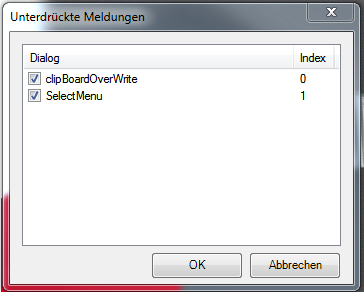
Das kleine Script erlaubt es, die unterdrückten Meldungen wieder einzeln zu aktivieren.

Vielen Dank an FrankS für die Umsetzung!
DeciderDisplayEnable

DeciderDisplayEnable (7122 Downloads )


// DeciderDisplayEnable, Version 1.0.0, vom 25.09.2013
//
// Zeigt alle Unterdrückten Meldungen in einer Liste an
// und ermöglicht durch entfernen der jeweiligen Checkbox
// das wiederanzeigen der unterdrückten Meldung.
//
// Copyright by Frank Schöneck, 2013
// letzte Änderung: Frank Schöneck, 25.09.2013 V1.0.0, -Projektbeginn
//
// für Eplan Electric P8, V2.2 / V2.3
//
using System.Windows.Forms;
using Eplan.EplApi.Scripting;
using Eplan.EplApi.Base;

public partial class frmDeciderDisplayEnable : System.Windows.Forms.Form
{
	[Start]
	public void Function()
	{
		//Form anzeigen
		frmDeciderDisplayEnable frm = new frmDeciderDisplayEnable();
		frm.ShowDialog();

		return;
	}

	private void frmDeciderDisplayEnable_Load(object sender, System.EventArgs e)
	{
		Settings oSettings = new Settings();
		string sDeciderNotDisplay = string.Empty;
		int iCountDeciderNotDisplay = 0;
		ListViewItem objListViewItem = new ListViewItem();

		if (oSettings.ExistSetting("USER.Decider.NotDisplay"))
		{
			//Anzahl Settings ermitteln
			iCountDeciderNotDisplay = oSettings.GetCountOfValues("USER.Decider.NotDisplay");

			//in ListView einlesen
			for (int n = 0; n < iCountDeciderNotDisplay; n++)
			{
				sDeciderNotDisplay = oSettings.GetStringSetting("USER.Decider.NotDisplay", n);
				objListViewItem = new ListViewItem();
				objListViewItem.Text = sDeciderNotDisplay;
				objListViewItem.Checked = true;
				objListViewItem.SubItems.Add(n.ToString());
				listView1.Items.Add(objListViewItem);
			}
		}
	}

	//Button OK
	private void btnOK_Click(object sender, System.EventArgs e)
	{
		Settings oSettings = new Settings();

		//Setting löschen!
		oSettings.DeleteSetting("USER.Decider.NotDisplay");

		//Setting nach löschen wieder neu anlegen
		oSettings.AddStringSetting("USER.Decider.NotDisplay",
		new string[] { },
		new string[] { }, "DeciderDisplayEnable",
		new string[] { "Default value of DeciderDisplayEnable" },
		ISettings.CreationFlag.Insert);

		int n = 0; //Zähler starten

		//Listview abarbeiten
		foreach (ListViewItem itemRow in listView1.Items)
		{
			if (itemRow.Checked) //wenn Ausgewählt Setting schreiben
			{
				//Setting schreiben
				oSettings.SetStringSetting("USER.Decider.NotDisplay", itemRow.Text, n);
				n++; //Zähler für VAL erhöhen
			}
		}

		//Beenden
		Close();
	}

	//Button Abbrechen
	private void btnAbbrechen_Click(object sender, System.EventArgs e)
	{
		Close();
	}
}
Von |2017-11-09T12:23:43+01:002013-09-27|EPLAN, EPLAN-Scripts|

megatrumpf.com

Mir hat es auf Anhieb gefallen… Quartett online gegen andere spielen! Da bietet sich doch auch das CodeQuartett an. Einfach registrieren und spielen und das kostenlos!

Es werden auch die Eigenschaften miteinander verglichen und die “Stärke” einer Karte errechnet, einfach genial!

2013-09-18_10-31-07

Vielen Dank an megatrumpf.com für die Umsetzung.

Von |2023-09-19T07:30:36+02:002013-09-18|Projekte|

BetterDesktopTool

Heute mal aus der Sammlung Programme-welche-ich-benutze … BetterDesktopTool.

Ist kostenlos erhältlich. Es teilt alle offenen Programmfenster übersichtlich auf und das ist, meiner Meinung nach, die schnellste Art zwischen Applikationen zu wechseln.

1

In der Professional-Edition (kostenpflichtig) werden mehrere Virtuelle Desktops unterstützt.

Endlich ein bisschen Mac-Feeling unter Windows  :tongue:

Von |2013-08-13T12:13:01+02:002013-08-13|Allgemein|

CopyMode

Um die Modi des Kopierens schnell und einfach zu wechseln, hat Luc Morin ein Script geschrieben. Vielen Dank an dieser Stelle nach Kanada!

12-08-2013 12-15-57

CopyMode (8284 Downloads )


/*
Copyright (c) 2013 STLM Inc.

This program is free software: you can redistribute it and/or modify
it under the terms of the GNU General Public License as published by
the Free Software Foundation, either version 3 of the License, or
(at your option) any later version.

This program is distributed in the hope that it will be useful,
but WITHOUT ANY WARRANTY; without even the implied warranty of
MERCHANTABILITY or FITNESS FOR A PARTICULAR PURPOSE.  See the
GNU General Public License for more details.

You should have received a copy of the GNU General Public License
along with this program.  If not, see <http://www.gnu.org/licenses/>.
*/

using Eplan.EplApi.Scripting;

public class STLMCopy
{
    //Add the two actions as menu points under Utilities
    [DeclareMenu]
    public void CopyNormalMenu()
    {
        Eplan.EplApi.Gui.Menu oMenu = new Eplan.EplApi.Gui.Menu();
        oMenu.AddMenuItem("Copy (Normal Mode)", "NormalCopyAction");
        oMenu.AddMenuItem("Copy (Design Mode)", "DesignCopyAction");
    }

    //Declare the action to force copy in normal mode
    [DeclareAction("NormalCopyAction")]
    public void NormalCopyAction()
    {
        bool toggled = false;

        if (DesignModeState)
        {
            ToggleDesignMode();
            toggled = true;
        }

        Copy();

        if (toggled)
            ToggleDesignMode();
    }

    //Declare the action to force copy in design mode
    [DeclareAction("DesignCopyAction")]
    public void DesignCopyAction()
    {
        bool toggled = false;

        if (!DesignModeState)
        {
            ToggleDesignMode();
            toggled = true;
        }

        Copy();

        if (toggled)
            ToggleDesignMode();
    }

    //Helper functions and properties

    private bool DesignModeState
    {
        get
        {
            return new Eplan.EplApi.Base.Settings().GetBoolSetting("USER.GedViewer.ConstructionMode", 0);
        }
    }

    private void ToggleDesignMode()
    {
        Eplan.EplApi.ApplicationFramework.ActionManager mgr = new Eplan.EplApi.ApplicationFramework.ActionManager();

        Eplan.EplApi.ApplicationFramework.Action act = mgr.FindAction("XGedActionToggleConstructionMode");
        if (act != null)
        {
            Eplan.EplApi.ApplicationFramework.ActionCallingContext ictx = new Eplan.EplApi.ApplicationFramework.ActionCallingContext();
            act.Execute(ictx);
        }
    }

    private void Copy()
    {
        Eplan.EplApi.ApplicationFramework.ActionManager mgr = new Eplan.EplApi.ApplicationFramework.ActionManager();

        Eplan.EplApi.ApplicationFramework.Action act = mgr.FindAction("XGedStartInteractionAction");
        if (act != null)
        {
            Eplan.EplApi.ApplicationFramework.ActionCallingContext CopyCtx = new Eplan.EplApi.ApplicationFramework.ActionCallingContext();
            CopyCtx.AddParameter("Name", "XMIaClipboardCopy");
            act.Execute(CopyCtx);
        }
    }

}
Von |2017-11-09T12:23:43+01:002013-08-12|EPLAN, EPLAN-Scripts|
Nach oben